90 Days with the Logitech MX Brio: Why I Finally Ditched My Mac's Built-in Camera
If setup steals Monday morning, I reject it. For Mac-centric hybrid workers needing immediate clarity, the Logitech MX Brio ($199.99) delivers. It works without dongle chains and survives gloomy ambient lighting. If you only take casual calls, stick to your laptop lens. Otherwise, this is my definitive pick.
Why I bought it (context + expectation)
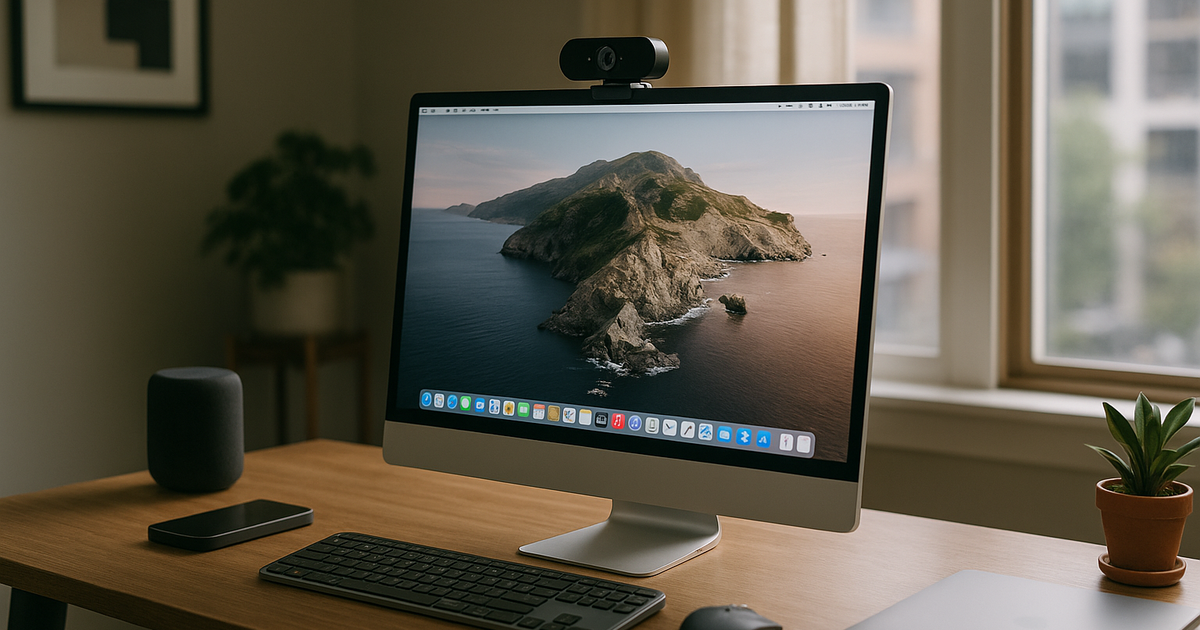
I noticed this during office-to-home transitions: every Thursday morning, my MacBook’s built-in camera struggled with the dim light in my Capitol Hill apartment. I was spending five minutes tweaking desk lamps just to look professional before an 8 AM sync. For my hybrid week, the bottleneck was visual clarity during client presentations. I looked at recurring weekly cost first, not the spec sheet, and time spent fixing lighting is time wasted. My partner and I have a joint purchase threshold of ~$450 for home office upgrades, so the $199.99 Logitech MX Brio easily fit the budget. I optimize for fewer context switches. I needed a 4K lens that could handle terrible lighting autonomously, mount securely on my small desk monitor, and integrate perfectly with my Apple-centric workflow without annoying workarounds.
How long I used it (timeline + frequency)
This evaluation spans exactly 90 days, covering roughly twelve complete sprint cycles. I measured this in meetings per week, not specs. Logging about 15 hours of video calls weekly, the sensor faced everything from gray Seattle mornings to harsh afternoon window glare. I firmly believe in avoiding complex maintenance; my tolerance is strictly 60 minutes a week for desk tech upkeep. The MX Brio required exactly zero minutes of ongoing configuration once dialed in. I never had to unplug it to reset the connection. It simply woke up whenever I launched a Zoom link.
Is it worth it (real gain)
Yes, the return on investment is tangible and immediate. I measure output, not gadget excitement. The core benefit here isn't capturing cinematic 4K footage; it's the automated light balancing and rock-solid macOS compatibility. Upgrading from a standard 1080p sensor eliminated the grainy visual artifacts that used to distract me during high-stakes screen shares. At roughly $200, it sits comfortably within the mid-high budget band. The aluminum chassis feels dense, and the physical privacy dial is a feature I use constantly to verify I'm off-camera without opening a software menu. Net focus gain was positive, so I kept it.
Pitfalls (hidden costs + friction)
First, the included USB-C cable is incredibly stiff. Because my desk zone is small, routing that thick wire cleanly around my monitor arm required multiple zip-ties to avoid visual clutter.
Second, the Logi Options+ software is surprisingly heavy. While native macOS compatibility is non-negotiable for me, downloading a 300MB utility just to tweak the field of view and contrast feels bloated. You don't need the application running constantly, but it is required for the initial crop adjustment. I despise excessive software bloat, but thankfully it stayed out of my way after day one.
Long-term changes (30/90/180 days)
On hybrid weeks, late Thursday afternoons are usually when my focus wanes and the ambient room light fades fast. Last week, my partner walked through the kitchen behind me to grab a coffee during a call. The camera's narrow crop kept them totally out of frame, and the exposure adjusted instantly to the dropping light. I didn't have to break my train of thought to reach for a lamp switch. My baseline is calm focus, not peak hype. Over three months, this peripheral systematically eliminated a recurring, low-level stressor from my environment. I keep tools that disappear into routine.
Who this is not for (clear boundary)
This only works when meeting load is normal to heavy. If you log just one or two casual internal check-ins a week, spending $200 is misallocating your tech budget. Skip this model if your setup relies heavily on older USB-A docking stations; it requires a direct USB-C connection to deliver raw 4K data without lagging, and I refuse to tolerate single-purpose dongle chains. Finally, if you expect the built-in microphones to replace a dedicated desktop mic, you will be disappointed. The audio is passable for emergencies, but nowhere near professional broadcast quality.
Alternatives (safer options)
If you want a cheaper option with aggressive AI tracking, the Insta360 Link 2C at $149.99 is a highly capable fallback. My confidence is medium on its software stability compared to Logitech's enterprise-grade reputation, but it packs a fantastic 4K sensor into a highly compact housing. It might actually be superior if your primary monitor has exceptionally thin bezels. Still, given Logitech’s seamless fit into my existing workspace ecosystem, I felt zero temptation to swap.
One-line verdict (would I buy again?)
A heavy-duty, zero-maintenance 4K upgrade that respects your time and integrates seamlessly into a Mac-centric hybrid workspace.
Related navigation: Ryan persona channel, digital-productivity cluster, hybrid-work-home-office scenario.